TABLE OF CONTENTS
- Introduction: How the General Ledger Works
- 1. Part 1 - Receivable Invoices (Sales)
- 2. Part 2 - Invoice Payment Lifecycle
- 3. Part 3 - Refunds and Write-Offs
- 4. Part 4 - Payable Bills (Expenses)
- 5. Recording a Bill Payment
- 6. Part 6 - Donations & Payout Expenses
- 7. Part 7 - Store Credit, Gift Cards & Overpayments
- 8. Part 8 — Proposals, Deposits & Wedding Orders
- 9. Part 9 — Wire Orders (Wire-In and Wire-Out)
- 10. Part 10 — How the P&L Report Works
Introduction: How the General Ledger Works
The General Ledger (GL) is the master record of every financial transaction in Hana Accounting. Every invoice, payment, refund, wire transfer, gift card, store credit, donation, and write-off flows into the GL automatically. It is the single source of truth that powers two critical reports:
Every transaction in the GL follows double-entry accounting: each entry has a matching Debit and Credit so the books always balance. The sections below walk through every scenario - from a simple POS sale to a multi-month wedding proposal - with the precise journal entries created in each case.
1. Part 1 - Receivable Invoices (Sales)
1.1 Invoice Created — No Payment Yet - Accounting Impact
When an order is placed in the POS and an invoice is generated but no payment is collected at that moment, the system recognises the revenue immediately and records the customer as owing the money.
Standard revenue invoice generation:
Basic invoice - $100 sale, no payment
With applied discount - $100 sale, $10 discount, $90 receivable
With delivery charge — $80 product + $20 delivery
With delivery and discount combined
With tax — $90 sale + $10 tax (tax is a liability, not income)
With delivery + tax combined
1.2 Payment Applied to an Invoice
When a customer pays, the payment clears the Accounts Receivable balance and records the incoming funds against the appropriate payment method account.
Payment received — cash, card, FTD, or bank
1.3 Invoice Updated
If an invoice is edited - for example, adding an item or changing a product - the system reverses the original journal entries in full and posts fresh entries reflecting the updated invoice. This ensures no residual balances are left from the old version.
Step 1 - Original entries already posted:
Step 2 - Reversal of original entries (all debits/credits flipped):
Step 3 - New entries posted for the updated invoice:
1.4 Invoice Voided or Cancelled
Cancelling an invoice reverses all of its original journal entries, effectively removing the transaction from the books as if it never happened.
Original entries posted:
Reversal entries posted on cancellation:
Note: If a payment has already been applied to the invoice, the payment must be refunded or cancelled first. The system will reject a cancellation request on a paid invoice.
2. Part 2 - Invoice Payment Lifecycle
2.1 Recording a Payment
When a payment is recorded against an invoice, the following journal entry is posted:
Payment by card or FTD
Payment by cash or bank transfer
2.2 Payment Updated
If a payment amount or method is changed, the original payment entry is reversed and a new one is posted.
The existing invoice payment already has the following accounting effects in place.
Step 1 - Reversal of original payment:
Step 2 - New payment entry posted:
2.3 Payment Voided or Cancelled
Voiding a payment reverses the payment entry and reinstates the Accounts Receivable balance, meaning the invoice returns to outstanding status.
Original payment:
Reversal on void:
3. Part 3 - Refunds and Write-Offs
3.1 Refund to Customer
A refund occurs when money is returned to a customer due to overpayment, product return, service cancellation or any other valid reason. The refund reduces the amount owed by the business and records the outgoing cash.
Refund of $30 to customer
Note: The payment clearing account (Cash, Bank, Credit Card, etc.) is Credited, indicating money is leaving the business. Accounts Receivable is Debited, recording the customer credit.
3.2 Receivable Write Off: Invoice Write-Off (Bad Debt)
When a receivable is deemed uncollectable - meaning the customer will not pay - the outstanding amount is written off as a bad debt expense. This removes it from the AR balance and records the loss.
Write-off of $100 uncollectable invoice
4. Part 4 - Payable Bills (Expenses)
The Accounts Payable side mirrors the receivable side but in reverse - the business owes money to vendors rather than being owed money by customers.
Note: Currently, Hana POS does not send payables, once procurement functionality is ready, will process it.
4.1 Bill Created - No Payment
Standard expense bill — $100
Bill with discount — reduces the amount owed
Bill with tax
4.2 Bill Payment
Bill paid — AP cleared, cash exits
4.3 Bill Updated or Cancelled
Same reversal logic as receivable invoices applies. Old entries are reversed and new entries are posted. A bill cannot be cancelled if a payment has already been made.
Bill Updated:
The existing bill already has the following accounting effects in place
The following accounting effects are reversed against the existing bill
New Bill - Updated Accounting Entries
Bill Cancelled:
The existing bill already has the following accounting effects in place
The following accounting effects are reversed against the existing bill.
5. Recording a Bill Payment
5.1. Bill Payment
Payment by card or FTD
Payment by cash or bank transfer
5.2 Bill Payment Updated
If a bill payment amount or method is changed, the original bill payment entry is reversed and a new one is posted.
The existing Bill payment already has the following accounting effects in place.
Step 1 - Reversal of original bill payment:
Step 2 - New bill payment entry posted:
5.3 Bill Payment Voided or Cancelled
Voiding a bill payment reverses the bill payment entry and reinstates the Accounts Receivable balance, meaning the bill returns to outstanding status.
Original payment:
Reversal on void:
5.4 Bill Write-Off
Payable write-off — liability cleared as income/gain
5.5 Payment Payback from Vendor
A payback occurs when a vendor refunds money to the business — for example, an overpayment refund, cancelled order, Credit Note Adjustment or quality dispute.
Vendor payback of $40 received
Note: Payments Clearing such as cash, bank, credit card etc.
6. Part 6 - Donations & Payout Expenses
6.1 Donation
When a customer's invoice balance is directed to a donation rather than being received as cash, it is recorded as a donation expense.
Invoice balance of $100 donated
6.2 Payout / General Expense
A payout or general operating expense (payroll, rent, supplies, etc.) is recorded as a journal entry deducting from cash and posting to the relevant expense account.
Payout of $125 — expense recorded
7. Part 7 - Store Credit, Gift Cards & Overpayments
7.1 Loyalty / Store Credit Issued
When store credit is issued to a customer (e.g., as a loyalty reward), the business incurs an expense and records a corresponding liability.
Store credit of $125 issued as loyalty reward
7.2 Advance Payment from Customer
When a customer pays in advance without a specific invoice being created yet, the funds are recorded as a liability until they are applied to an invoice.
Advance payment of $75 received
Customer Balance Handling (Eg: Future Proposal Scenario)
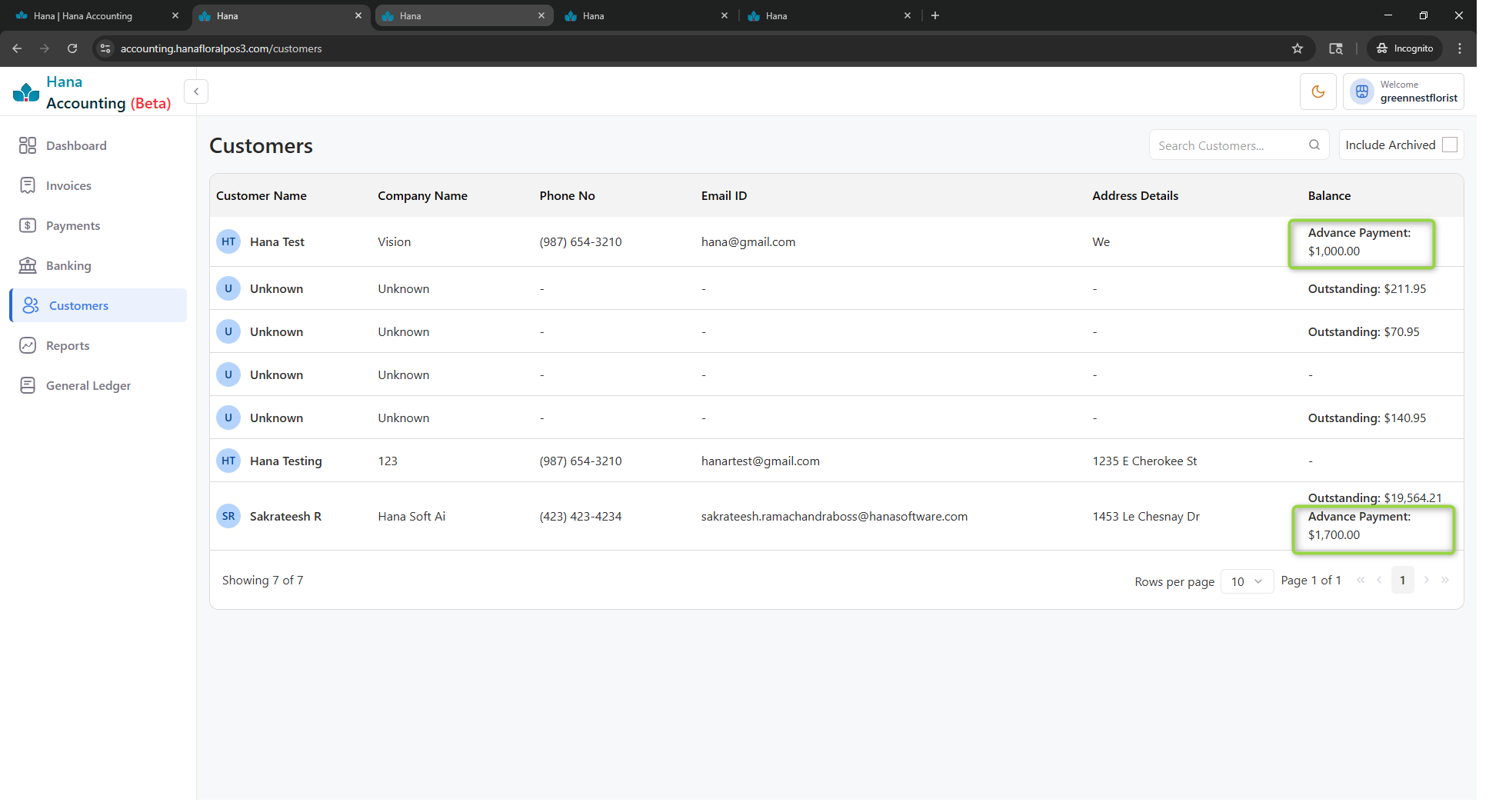
Advance Payment Recording
- If a customer makes a payment prior to invoice creation, the payment is not linked to any invoice at that time.
- The payment information is displayed in Hana Accounting as an Advance Payment.
- The transaction is recorded as a liability in the accounting system.
Accounting Entry:
- Debit: Cash / Bank / Credit Card
- Credit: Advance Payments – Liabilities (Advance Payment Account)
Customer Balance Maintenance
- The advance payment is reflected as a credit balance in the customer account.
- This balance represents an amount received but not yet earned or applied.
- The system maintains this as customer-level available balance until invoice generation.
Invoice Sync and Adjustment
- Once the proposal reaches its scheduled time, the invoice is generated and synced.
- During this process:
- The system automatically applies the available advance balance from the Hana Advance Payment Account.
- The advance amount is adjusted against the invoice from the customer balance.
Final Outcome
- The customer’s advance balance is reduced or cleared based on the invoice amount.
- The invoice is partially or fully settled using the advance payment.
- Revenue is recognized only after invoice creation.
Key Points to Note
- Advance payments are always treated as liabilities until applied.
- No revenue recognition occurs at the time of receiving advance payments.
- Customer balance ensures seamless adjustment when the invoice is generated.
- This approach maintains accurate financial reporting and compliance.
7.3 Overpayment by Customer
When a customer pays more than the invoice total, the excess amount is treated as an overpayment and recorded as store credit. This ensures the additional amount is properly tracked and can be utilized for future transactions or refunded if required.
Overpayment of $75 recorded as store credit liability
Overpayment by Customer – Customer Balance Handling
Overpayment Recording
- If the payment received exceeds the invoice amount, the excess amount is not treated as revenue.
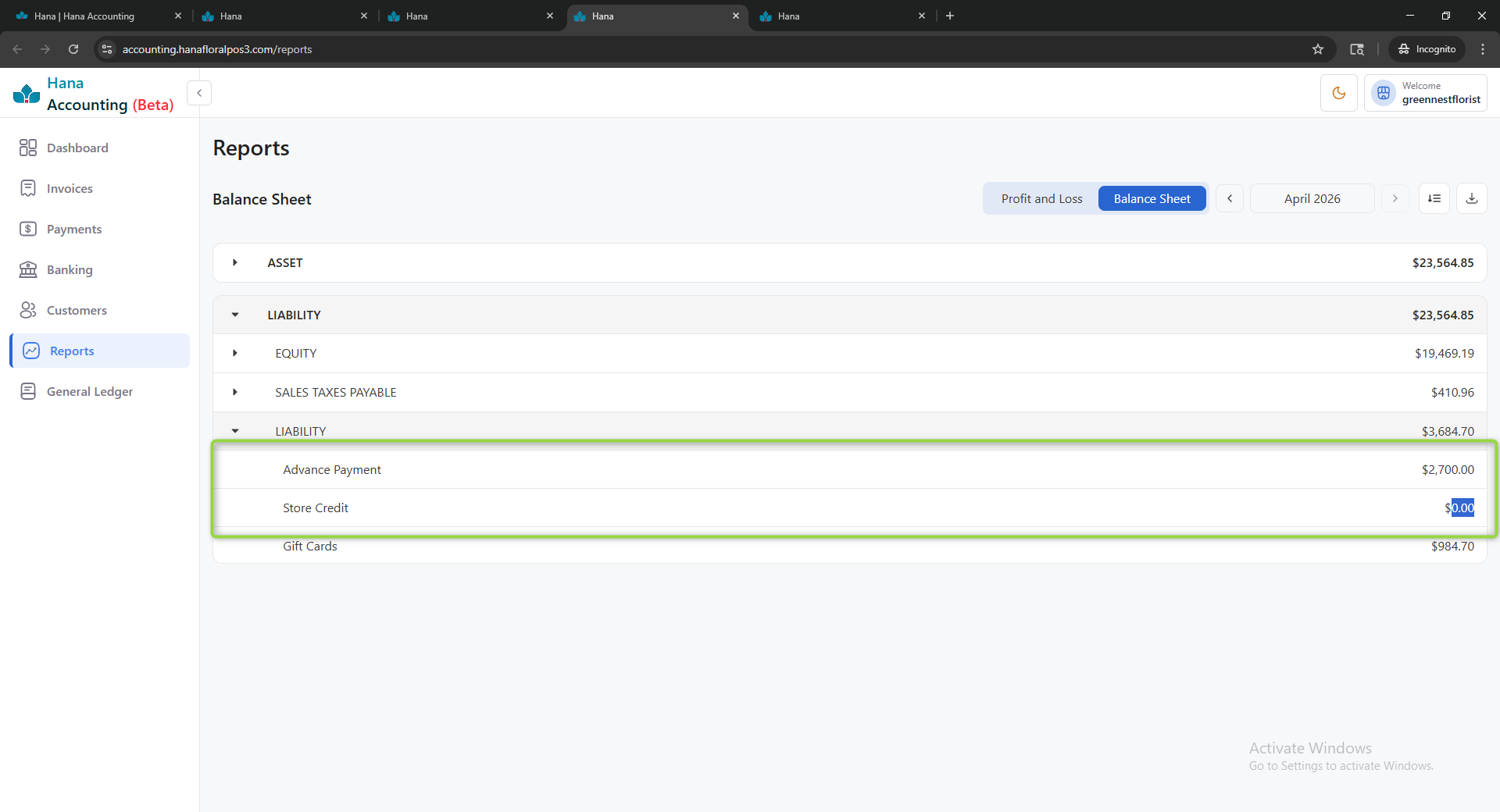
- Instead, it is recorded as Store Credit – Overpayment (Liability).
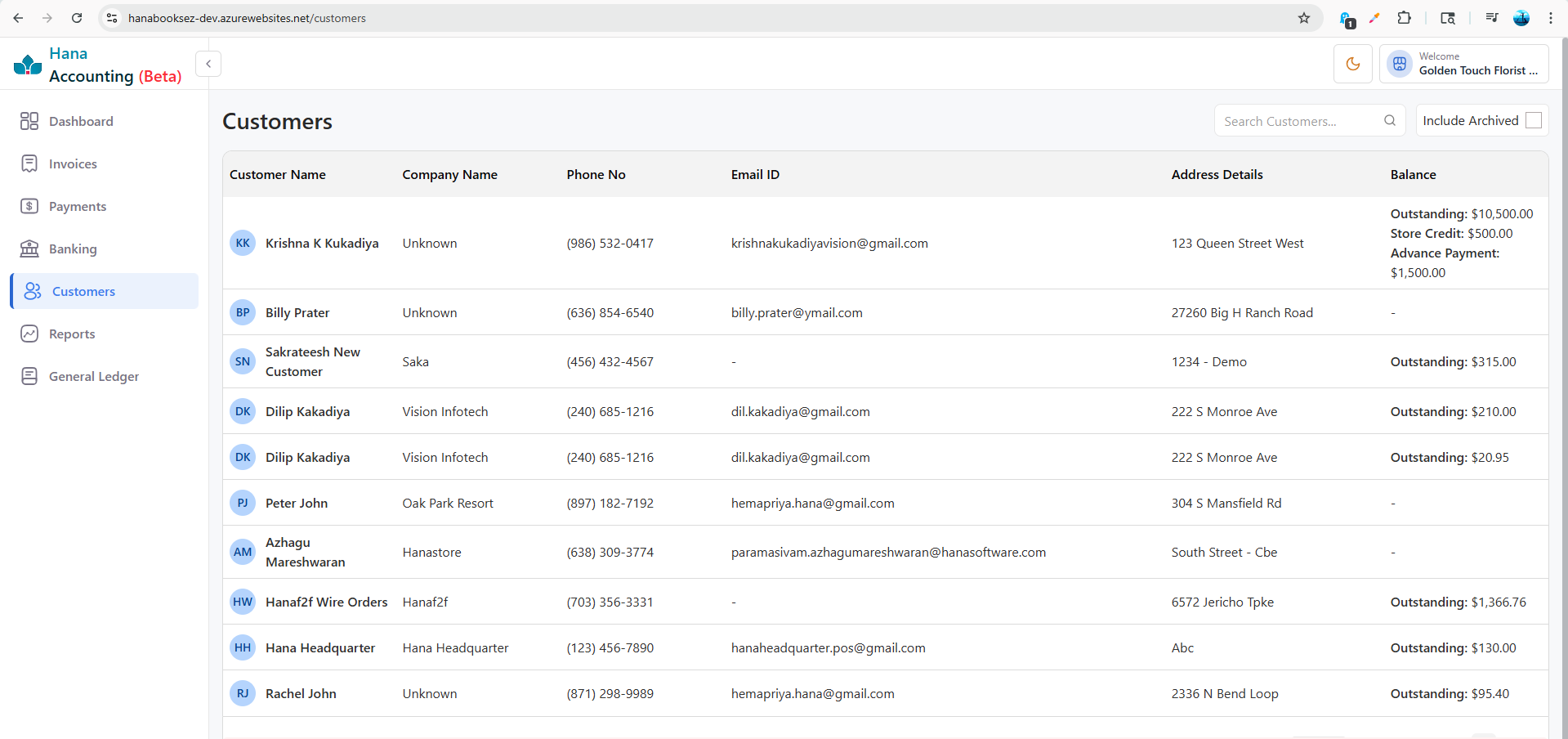
- The store credit is associated with the respective customer and displayed in Hana accounting accordingly.
Accounting Entry:
- Debit: Cash / Bank / Credit Card
- Credit: Store Credit – Overpayment (Liabilities)
Customer Balance Maintenance
- The overpaid amount is maintained as a store credit balance under the customer account.
- This balance represents a liability, indicating that the business owes the customer.
- The customer’s account will reflect this as an available credit balance for future use.
Utilization of Store Credit
- During future purchases or invoice generation:
- The available store credit is applied to the invoice.
- The applied amount is deducted from the customer’s store credit balance.
- In Hana Accounting, this is reflected as:
- A reduction in the Store Credit – Liability account
- Corresponding adjustment against the invoice
Final Outcome
- The customer’s store credit balance is reduced based on usage.
- The invoice payable amount is lowered or fully settled using the available credit.
- If unused, the store credit remains in the system until:
- It is applied to a future invoice
Key Points to Note
- Overpayments are always treated as liabilities, not revenue.
- Store credit is customer-specific and trackable.
- All adjustments are synchronized with Hana Accounting to maintain accurate financial records.
- Ensures proper handling of excess payments and transparent customer balance tracking.
7.4 Gift Card — Issued
A gift card is a prepayment. When sold, the funds are received but the service has not yet been rendered, so the amount is recorded as a liability.
Invoice includes $100 order + $20 gift card portion
7.5 Gift Card — Redeemed
When a customer redeems a gift card as payment, the liability is reduced and the receivable is cleared.
Gift card of $20 redeemed against invoice
8. Part 8 — Proposals, Deposits & Wedding Orders
This section covers the most nuanced accounting scenario: a proposal accepted with a deposit, followed by the actual event — potentially weeks or months later. Understanding how the deposit moves through the books is critical.
8.1 Proposal Accepted — Deposit Collected
When a proposal (e.g., a wedding order for a future date) is accepted and the customer pays a deposit, the deposit cannot yet be recognised as revenue. The work has not been performed. Instead, the deposit is recorded as a Liability — money the business has received but not yet earned.
Customer pays $50 deposit on a $100 wedding proposal
8.2 The Wedding Month Arrives — Converting the Deposit to Revenue
When the event date arrives and the order is fulfilled, the advance payment (liability) is converted into recognised revenue. At the same time, the remaining balance can be collected.
Step 1 — Invoice is generated for the wedding order:
Wedding invoice raised — $100 total
Step 2 — Deposit is applied as payment (liability cleared, AR reduced):
Deposit of $50 applied — liability converted to payment
Step 3 — Remaining balance collected ($50 still outstanding):
Final payment of $50 collected on event day
8.3 Payments Applied in the Same Month as the Event
When payments are made in the same month as the wedding or event — whether in advance or on the day — the accounting is the same as above. Each payment clears the corresponding portion of Accounts Receivable.
Partial payment applied in April
Remaining balance cleared in April
Note: The P&L will show $100 revenue in April. Multiple partial payments simply split the AR clearance across multiple vouchers — the total revenue and the total cash collected are the same.
9. Part 9 — Wire Orders (Wire-In and Wire-Out)
9.1 Wire-In Order
A Wire-In order is received from a wire service (e.g., FTD, Teleflora). The order arrives from the wire network and is fulfilled locally. Payment is received from the wire service, not directly from the end customer.
Wire-in order of $72.98 received from wire service
When payment is received from the wire service:
Wire service settlement received
9.2 Wire-Out Order
A Wire-Out order is sent to a partner florist in another location. The business collects from the customer locally, then sends 80% of the net wire amount to the receiving florist (the relay amount). A credit memo is issued to the wire network for the relayed order.
Wire-out invoice raised — $115.97 total
Cash payment received from customer:
Credit memo for $72 (80% of $90 wire amount) sent to wire network:
Wire relay payment of $72 sent to partner florist
10. Part 10 — How the P&L Report Works
The Profit & Loss (P&L) report is automatically generated from the General Ledger. Here is exactly how each scenario above contributes to the P&L:
Was this article helpful?
That’s Great!
Thank you for your feedback
Sorry! We couldn't be helpful
Thank you for your feedback
Feedback sent
We appreciate your effort and will try to fix the article