What is Hana Accounting & Bookkeeping Service?
Hana Accounting is a simple, easy-to-use tool that can replace QuickBooks for flower shops that do not need a comprehensive accounting software with all the bells and whistles.
Hana Accounting automatically integrates with Hana POS and can also connect and download your bank transactions, and quickly help you to reconcile all your financial transactions in one place. It will generate the Monthly P&L and reports, and also provide a basic General Ledger. It is super easy to use and eliminates the stress related to tax season.
We intend to keep it simple, basic, and help Florists stay on top of their finances. It is deliberately kept simple and easy, without all the confusing features that non-accountants cannot make sense of.
Bookkeeping Service: Hana also offers bookkeeping services to subscribers of Hana Accounting. A dedicated bookkeeper will review all your transactions and keep your general ledger in order and ensure your Monthly P&L is generated without fail.
Periodically, your bookkeeper will email you questions about transactions they see in your accounting module, and it is the florist's responsibility to answer them as soon as possible so that your books are in good shape.
About Dashboard
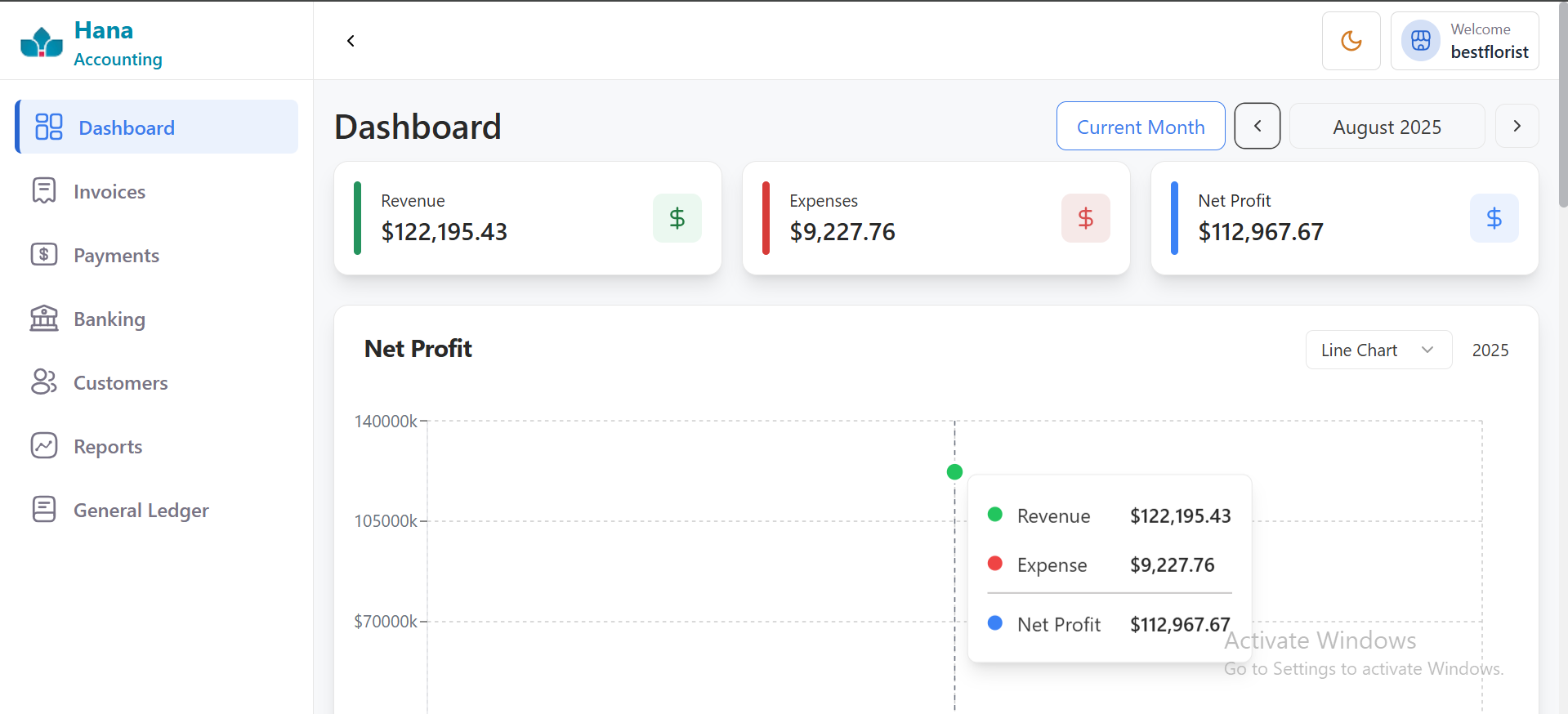
The Dashboard is the main page you see when you open Hana Accounting - it shows the most important values and charts about the shop. You do not need to open many pages to know how the shop is doing.
3) What you will find on the Dashboard
Revenue (Sales)
This is the total money you earned by selling items (like flower bouquets). It may also include delivery charges and extra fees.
Example: If you sold 10 bouquets at ₹200 each, revenue = ₹2,000.
Expenses (Costs)
This is the total money you spent. It can be for buying items, paying workers, rent, or other things.
Example: If you paid ₹500 for flowers and ₹200 for rent, expenses = ₹700.
Profit & Loss (Net Result)
This shows whether you earned more than you spent. It is calculated as: Profit = Revenue – Expenses.
Example: Revenue ₹2,000 – Expenses ₹700 = Profit ₹1,300.
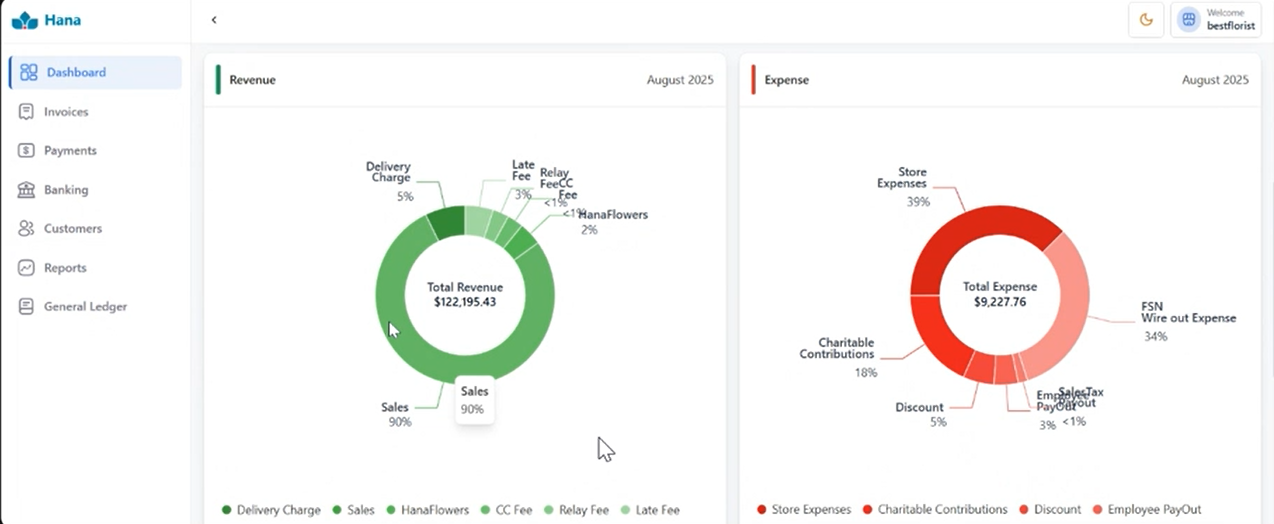
Category-wise Charts
Small charts that show which types of sales or expenses. For example, how much money came from Delivery fee, gift cards etc.,x`
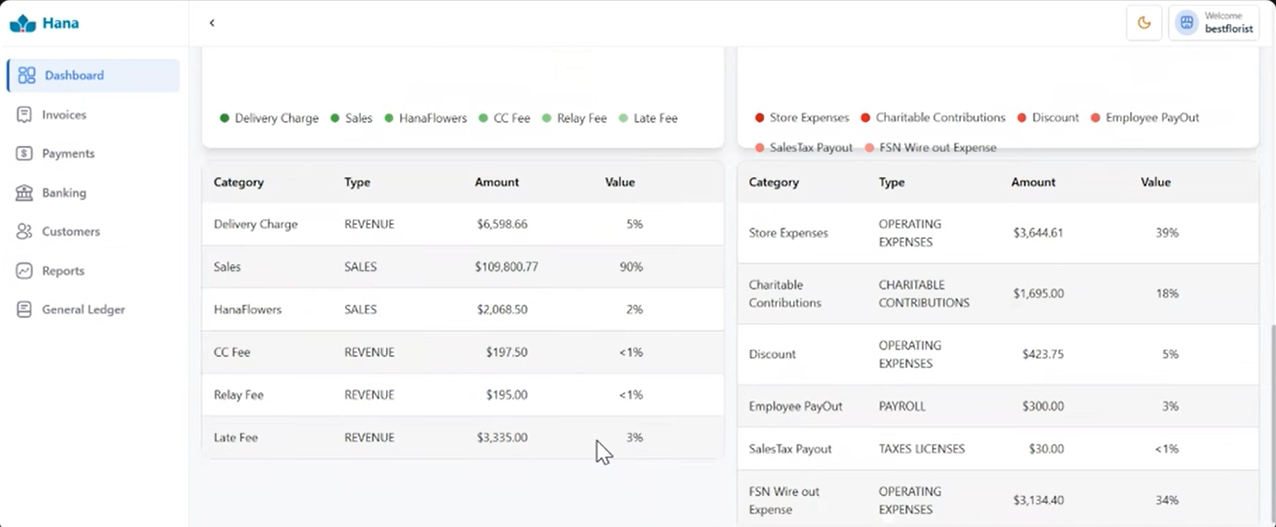
Default Time Period
By default, the Dashboard shows this month’s numbers. You can change the time range if you want.
Example
Robert runs a small flower shop called BloomJoy. On Monday:
She sold bouquets worth ₹5,000 (Revenue).
She spent ₹2,000 for supplies and delivery (Expenses).
Dashboard shows Net Profit ₹3,000.
Was this article helpful?
That’s Great!
Thank you for your feedback
Sorry! We couldn't be helpful
Thank you for your feedback
Feedback sent
We appreciate your effort and will try to fix the article