TABLE OF CONTENTS
- 1. What is the Customers Module?
- 2. How Does It Work?
- 3. How Customer Records Are Created
- 4. How Customers Link to Invoices and Payments
- 5. How to Search and Filter Customers
- 6. Key Benefits
1. What is the Customers Module?
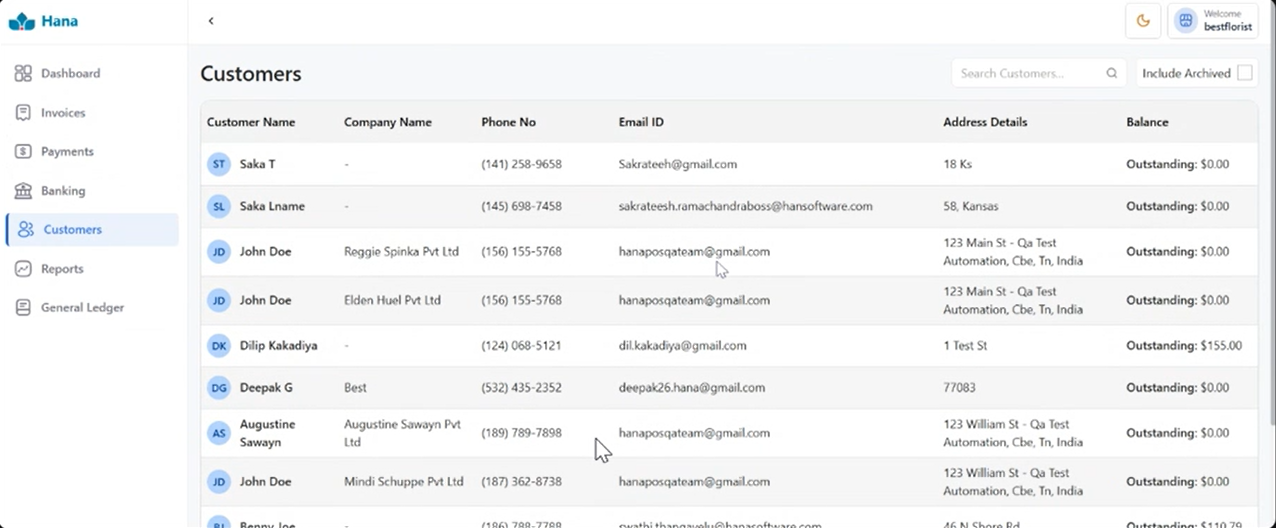
The Customers module is where all your customer details are stored for accounting purposes. It keeps track of every customer's invoices, payments, and outstanding balances, giving you a complete financial picture for each person you do business with.
2. How Does It Work?
An important thing to understand is that the Customers module in Hana Accounting does not simply mirror your POS customer list. A customer record is only created in Hana Accounting when that customer has an actual financial transaction, meaning when their first invoice is generated.
This keeps your accounting records clean and relevant, storing only customers who have actually made a purchase.
3. How Customer Records Are Created
Here is the step-by-step of how it works:
Step 1: A florist adds or edits a customer in Hana POS. The customer exists in the POS for order processing, but no record is created in Hana Accounting yet.
Step 2: The first time an invoice is generated for that customer, Hana Accounting automatically creates a customer record.
Step 3: From that point on, all invoices and payments for that customer are linked to their record in Hana Accounting.
A simple example:
John Doe is added to the POS. No record is created in Hana Accounting yet.
An order is placed, and an invoice is generated for John Doe. Hana Accounting now automatically creates a customer record for him.
All future invoices and payments for John are linked to that record.
4. How Customers Link to Invoices and Payments
Once a customer record exists in Hana Accounting, the following happens automatically:
Every invoice raised for that customer is linked to their record.
Every payment received from that customer is tied to the same record.
A complete financial history is maintained for that customer, so you can always see what was sold, what was paid, and what is still outstanding.
5. How to Search and Filter Customers
On the Customers page, you will find filters to help you find specific customers quickly:
Search by Name: Type a customer's name to pull up their record.
Filter by Outstanding Balance: View only customers who have pending dues or unpaid invoices.
Filter by Date Range: Look at invoices and payments within a specific time period.
6. Key Benefits
One Place for All Customer Accounts: Every invoice and payment for a customer is visible in one place, so you always have a clear picture of where things stand.
No Duplicate Entry: Customer details sync automatically from POS. You never have to enter the same information twice.
Better Credit Tracking: You can easily see which customers have outstanding balances or pending dues, helping you follow up on time.
Faster Resolution: Clear and complete records make it easy to sort out any payment questions or disputes quickly and professionally.
Was this article helpful?
That’s Great!
Thank you for your feedback
Sorry! We couldn't be helpful
Thank you for your feedback
Feedback sent
We appreciate your effort and will try to fix the article